Beginner's Guide

Your First 30 Minutes in the Wasteland

You just registered. You're staring at a settlement with one building and some resources. Here's exactly what to do — step by step, no guesswork.

What We'll Cover
01Understanding Your Settlement 02Your First Build Order 03Training Your First Troops 04Reading the World Map 05Your First Raid 06Understanding Battle Reports 07Growing Your Economy 08What to Do Next
01
Orientation
Understanding Your Settlement
~ 2 minutes

When you first log in, you'll see the Settlement View — a grid of building slots, a resource bar at the top, and sidebars with queues and troop information. Here's what matters right now:

The Resource Bar runs across the top. You have four resources: Scrap (building material), Concrete (fortification), Fuel (advanced tech), and Food (troop upkeep). Each shows your current amount, storage cap, and production rate per hour. You start with 500 of each — a full stockpile at your base storage cap.

The Building Grid shows your settlement's buildings. You start with a single Level 1 Bunker — this is your headquarters. The Bunker controls how many building slots you have and caps the level of every other building. Right now you have 8 slots with 1 used.
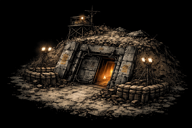
Level 1 Bunker
Your Level 1 Bunker. It doesn't look like much yet — a scrappy shelter cobbled together from scrap metal and tarps. But every settlement in the wasteland started here. By the time it hits Level 30, it'll be an imposing fortress.

The Left Sidebar shows your build queue, training queue, and troops at home. It's empty right now — that's about to change.

💡
Beginner Protection: You have a 72-hour shield protecting you from player attacks. Use this time to build up your economy and army without worrying about raids. NPC raider camps can still be attacked during protection — and should be.
02
Foundation
Your First Build Order
~ 5 minutes to queue

Your first priority is resource production. Without resources, you can't build anything else. Here's the optimal opening build order:

1
Scrapyard
Build a Scrapyard (empty slot)
Scrap income
2
Quarry
Build a Quarry (empty slot)
Concrete income
3
Farm
Build a Farm (empty slot)
Food for troops
4
Bunker
Upgrade Bunker to Level 2
Unlock higher levels
5
Warehouse
Build a Warehouse (empty slot)
Increase storage cap
6
Bunker
Upgrade Bunker to Level 3
Unlock military buildings
7
Training Camp
Build a Training Camp (requires Bunker 3)
Train troops!
📋
How to build: Click an empty slot in the building grid (marked with a +). The build menu opens showing what's available. Buildings you can't afford or don't meet the requirements for will be greyed out. Click a building to start construction.
💡
Why no Refinery yet? Fuel isn't needed for early buildings or basic troops. You'll want one by Bunker level 5, but for now Scrap, Concrete, and Food are the bottlenecks. Don't waste a building slot on Fuel production when you need the economy running first.
03
Military
Training Your First Troops
~ 3 minutes

Once your Training Camp finishes, you can train your first soldiers. You have three unit types available at the start:

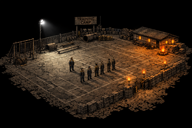
Training Camp
The Training Camp is where your army begins. At Level 1 it's a rough training ground — but it's enough to start producing fighters. Higher levels reduce training time by 5% per level.

Scouts (0 attack, 30 speed) — can't fight, but they're the fastest unit and essential for gathering intelligence on enemy settlements later. Skip them for now.

Scavengers (10 attack, 50 carry) — cheap, fast, and carry a lot of loot. Your primary raiding unit in the early game. Their attack is low but they're expendable and their carry capacity makes raids profitable.

Militia (25 attack, 30 defense, 15 carry) — the backbone of your army. Better fighters than Scavengers but slower and carry less. You'll want a mix of both.

Your first training order: Train 20 Scavengers and 10 Militia. Use the MAX button to see how many you can afford, then adjust. This gives you enough firepower to raid a Level 1 raider camp while the Scavengers haul the loot home.

⚠️
Watch your Food! Every troop consumes Food per hour. Scavengers eat 1/hr, Militia eat 2/hr. If your Food production can't keep up with troop upkeep, your Food will hit zero and troops will start deserting (10% per cron tick). Always check the Food Balance in the left sidebar before training more troops.
04
Exploration
Reading the World Map
~ 3 minutes

Click the World Map tab to see the wasteland. Your settlement is the green marker in the center of the view. The map is 500 × 500 tiles — you're seeing a small chunk of it.

Drag to pan around the map. Scroll to zoom in and out. When zoomed in, you'll see terrain sprites — cracked wasteland, ruined buildings, dead forests, glowing radiation zones, and dark mountains. When zoomed out, it simplifies to colored tiles for performance.

The things you care about right now are the raider camp markers scattered around your settlement. They come in five tiers based on difficulty:

Tier I — Outpost (Level 1-2) Green dots. Easy. Start here.
Your target
Tier II — Hideout (Level 3-4) Yellow dots. Moderate challenge.
Soon
Tier III — Stronghold (Level 5-6) Orange dots. Bring a real army.
Mid-game
Tier IV — Fortress (Level 7-8) Red dots. Serious fight.
Late-game
Tier V — Citadel (Level 9-10) Purple dots. Boss camps.
Endgame

Click a camp to see its details — level, estimated garrison, and the Attack button. Find a Tier I camp near your settlement. The closer it is, the shorter your march travel time.

💡
Camps scale dynamically. Camp levels are based on the average player progression in the neighborhood. Early on, most camps near you will be Level 1. As you and nearby players grow, camps will respawn at higher levels with better loot.
05
Combat
Your First Raid
~ 5 minutes

You have troops. You've found a camp. Time to fight.

Click the camp on the map and hit Attack. The march panel opens. You'll see your source settlement, the target, the distance, and a troop selector. Select your troops — for a Level 1 camp, send all your Scavengers and Militia. Use the ALL button to select everyone.

The panel shows three important numbers: Total carry capacity (how much loot your troops can haul home), Travel time (how long until they arrive — based on your slowest unit's speed), and March slot usage (you start with 1 march slot; upgrade the Radio Tower for more).

Hit Send March. Your troops are now traveling to the target. You can see the march on the map as an animated line with a moving dot showing troop position. The right sidebar shows the countdown timer.

When troops arrive, combat resolves instantly. You don't need to be online. The cron tick processes the battle and creates a report. Your surviving troops automatically begin marching home with whatever loot they captured.

🧮
Combat math simplified: Your total attack is compared to the defender's total defense. If you have a big advantage (like 5:1), you'll win with minimal losses. Close fights (1.5:1) are expensive for both sides. When in doubt, send more troops than you think you need — the cost of losing is much higher than the cost of slight overkill.
⚠️
Carry capacity matters! If you win the battle but your troops can't carry all the loot, the excess is left behind. Scavengers carry 50 resources each. Militia only carry 15. For farming camps, bring more Scavengers than Militia to maximize profit per raid.
06
Intelligence
Understanding Battle Reports
~ 2 minutes

After your troops arrive and the battle resolves, a new report appears in the Reports tab (the nav badge shows your unread count). Click into a report to see the full breakdown:

Result — Victory or Defeat, plus the luck factor (a random modifier between -15% and +15% that can swing close fights).

Attacker Units — shows how many of each unit type you sent and how many survived. The difference is your losses.

Defender Units — shows the camp's garrison and their losses. On a victory, the defender loses everything. On a defeat, you lose everything.

Loot — the resources captured, split across all four types. This was capped by your surviving troops' total carry capacity.

Points — experience points earned. These increase your player ranking and contribute to your settlement's score. Points never decrease.

💡
Track your efficiency. Compare the loot gained against the cost of replacing lost troops. A good raid earns significantly more in loot than it costs to rebuild your losses. If a camp is too expensive to farm profitably, target an easier one or bring a bigger army to reduce casualties.
07
Economy
Growing Your Economy
~ 10 minutes (then ongoing)

After your first successful raid, you should have more resources than you started with. Now it's time to build the engine that will power everything else. Your priorities over the next hour:

1
Scrapyard
Upgrade Scrapyard and Quarry to Level 3-4
Higher production
2
Farm
Build a second Farm (multiple allowed)
Support more troops
3
Warehouse
Upgrade Warehouse to Level 3-4
Don't waste overflow
4
Granary
Build a Granary
Food storage cap
5
Refinery
Build a Refinery (requires Bunker 3)
Fuel for later

The resource loop: Build resource buildings → produce more resources → upgrade buildings → produce even more. Between builds, keep sending raids to supplement your income. A Tier I camp gives 200-700 of each resource per raid. That adds up fast when you're raiding every 15-20 minutes.

⚠️
Storage cap matters! If your resources hit the cap, production is wasted — you're earning zero until you spend down. Keep your Warehouse and Granary upgraded enough that you never sit at cap for long. If you see a resource at 100%, either spend it or upgrade storage immediately.
💡
Bunker is always the bottleneck. No building can exceed your Bunker level. If your Scrapyard is Level 5 and your Bunker is Level 5, you need to upgrade the Bunker to 6 before anything else can go higher. Plan Bunker upgrades ahead — they're the most expensive building but they gate everything.
08
What's Next
Beyond the First 30 Minutes
The rest of your wasteland career

You've built your foundation, trained an army, and raided your first camp. Here's what to focus on as you grow:

Bunker
Push Bunker to Level 5 — unlocks the Watchtower (incoming attack warnings) and Radio Tower (alliance features + more march slots)
Watchtower
Build a Watchtower — without one, you get zero warning when someone attacks you. Higher levels reveal more detail about incoming threats.
Radio Tower
Build a Radio Tower — unlocks alliance membership and gives you additional march slots so you can farm multiple camps simultaneously.
Join an Alliance — solo players get conquered. Alliance members get defended. Find an active alliance and join as soon as your Radio Tower is up.
Barricade Wall
Build a Barricade Wall — adds a percentage defense bonus to all your defending troops. Every level matters when someone comes knocking.
Workshop
Build a Workshop — unlocks the Research tree. Three branches (Offense, Defense, Economy) let you specialize your playstyle.
Start farming Tier II camps — as your army grows, graduate to yellow (Level 3-4) camps for significantly better loot. Bring extra troops.
Sniper Nest
Unlock Snipers — at Workshop 5 + Training Camp 5, you can build a Sniper Nest. Snipers are glass cannons with 50 attack — devastating on offense.
🎯
Remember: Your beginner protection lasts 72 hours. Use every minute to build, train, and stockpile. When the shield drops, you want to be strong enough that attacking you isn't worth the cost — or allied with people who will make the attacker regret it.

Ready to Build Your Settlement?

You know the basics. The rest you'll learn by doing. Every great empire in the wasteland started with a single Bunker.

Start Playing — Free